Redesigning EJCAM's website around its four key audiences
A redesign of the website of EJCAM, Aix-Marseille University's school of journalism and communication, built around the needs of its four key audiences — applicants, students, alumni and companies — to make information easier to find through a clearer structure and a modern, accessible interface. Now live, the new website was very well received by the school.
The Challenge
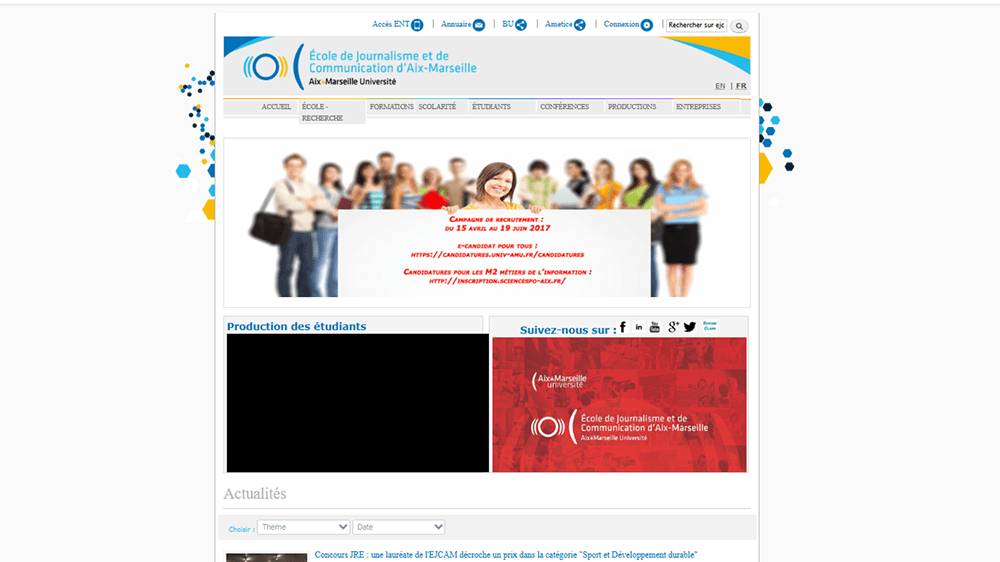
EJCAM is Aix-Marseille University's school of journalism and communication, and one of the few journalism schools in France recognised by the profession. Its website, however, had remained largely unchanged for years: an outdated interface, inconsistent layouts and complex navigation made it difficult for visitors to find what they were looking for.
The site also had to serve very different audiences — prospective students, current students, alumni and companies — each looking for different information, but all faced with the same dense navigation.
Project goals:
- Modernise the visual identity of the website
- Give each audience a direct path to the information it needs
- Simplify navigation and improve information hierarchy
- Ensure a fully responsive experience
- Create a scalable and maintainable UI foundation within Drupal
The challenge was to reflect the school's standing with a modern, clearer experience, without disrupting the existing university content ecosystem.
My Approach
Before designing interfaces, I focused on understanding who visits the website, what each audience comes for, and where the existing structure made their journey harder.
1. Research & Benchmark
I analysed several higher education websites to identify common UX patterns and usability issues.
Key insights:
- Prospective students expect immediate access to admissions and programmes
- Content-heavy sites benefit from structured menus that reveal their depth
- Navigation clarity matters more than visual complexity
- Mobile navigation is critical for a young audience
These insights directly informed the navigation strategy and the homepage structure.
2. Navigation Built Around Audiences
The key decision of the project was to organise access to information around who the visitor is, rather than around the school's internal structure.
Audience entry points:
- “I'm an applicant” — admissions and programmes
- “I'm a student” — practical and academic information
- “I'm a graduate” — alumni network
- “I represent a company” — partnerships and apprenticeship tax
The main navigation was also simplified, with dropdown menus revealing the content of the richest sections, so that every visitor can reach relevant content in a few clicks.
3. Wireframes
Low-fidelity wireframes were used to validate the structure, hierarchy and navigation before moving into UI design.
Explored areas:
- Homepage structure and audience entry points
- Programme and student page templates
- Navigation behaviour and menu structure
This phase allowed quick iteration and reduced implementation risks.
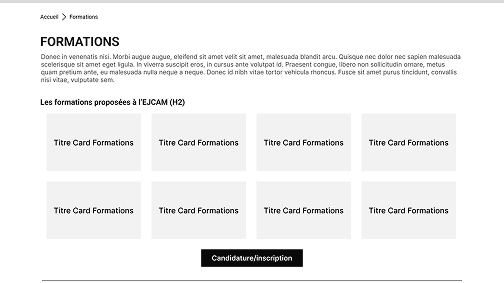
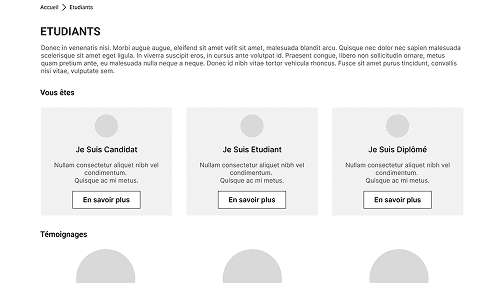
(Wireframes of the Homepage (top), Programmes (left) and Students (right) pages.)
4. UI Design System & Visual Accessibility
A design system was created to ensure consistency across the website and support its evolution, with visual accessibility treated as a core constraint.
Key principles:
- A colour system built on the school's identity, with contrast checked for readability
- A clear typographic scale and hierarchy
- Reusable cards, buttons and content modules
- Visible interactive states
- No information conveyed by colour alone
This system kept the interface consistent and readable across every page.
5. Stakeholder Alignment & Drupal Constraints
The project involved administrative staff, academic staff, content editors and developers, within the university's existing Drupal environment.
Key considerations:
- Translating institutional needs into clear user journeys
- Regular feedback from the school throughout the process
- Alignment with developers on technical feasibility
- Predefined content structures and long-term maintenance by non-design teams
These constraints led to a component-based approach, realistic to build and maintain.
6. Prototyping
An interactive prototype was used to present the key user journeys to stakeholders before development, ensuring a shared understanding of the navigation and page behaviour.
Outcome
The new EJCAM website is now live. The school was very satisfied with the result: a website that is more functional, simpler to navigate and more modern, and that better reflects its position among France's recognised journalism schools.
Key improvements
- Direct entry points for applicants, students, alumni and companies
- Simplified and clearer navigation
- Modern visual identity aligned with the school's standing
- Improved readability and visual accessibility
- Fully responsive experience
- Reusable components for long-term maintenance
1 / 4
Key Learnings
This project showed me how much a website's structure can change its usability. Organising navigation around audiences rather than internal departments made the experience clearer without removing any content.
It also reinforced the importance of designing within real-world constraints — institutional expectations, existing content and a CMS environment — while keeping a clear vision of the user experience.
Finally, building a reusable design system from the start made the interface more consistent and easier to maintain over time.